
Kramer Pro Finance Knowledge Base
All Finance, HR, and Back Office Operations knowledge in one place!


Finance
AP/AR, payroll, month-end close, GL coding, QuickBooks, banking, and taxes.
Human Resources
Paycom, payroll, benefits, 401(k), tax forms, and everything people-related at Kramer Pro.
Operations
Internal tools, incident reporting, safety resources, and facilities.
Forms & Quick Links
Every form, system login, and external tool link in one place.
Key Contacts
Internal team inboxes and all external vendor, broker, and bank contacts.
Calendar
Upcoming payroll dates, benefits deadlines, and key company events.
Accounts Payable Policies
A guide to Accounts Payable at KRAMER PRO
Rules
- W9 required for all vendor invoices. No W9, no payment. No exceptions.
- All invoices must go through the approval process.
- We do not pay credit card fees. It may only be 3%, but it compounds over a year.
- ACH is the preferred payment method. Wire transfer and check available as needed. Most checks today are for Christmas bonuses.
- We only pay off of invoices. The document must say "invoice" — statements, quotes, and POs aren't payable off of.
Vendor invoices go to apinvoices@kramer.pro — this is an unmonitored inbox that only forwards into Ramp and is intended to help with IRS record keeping best practices. For general AP questions use accounting@kramer.pro.
Emergency Scenarios
For all verbal approvals: note the approver's name, date, and time in Ramp. Example: "Verbal approval given by M. Chamot — 12/3/2025 at 2:55 PM"
Scenario 1: Team on-site needs to rent something last minute
- Under $20k: Take verbal approval from the lead (Department Lead or VP minimum). Note with timestamp in Ramp; list yourself as sole approver.
- Over $20k: Call Stephen Kramer. Get him into Ramp urgently or take verbal approval using procedure listed above.
Scenario 2: Urgent COGS need — Purchasing needs to order from JB&A or similar
- Allow via P-Card. Confirm it's a genuine emergency — not just a preference to get something faster.
Payment Methods
ACH is our preferred payment method, but wire transfer and check are available. If you can put it on your P-Card without fees, you have finance's blessing to do so.
If a need is urgent, or will directly affect client deliverables please reach out to finance work through processing timelines.
Accounts Receivable & Collections
"How we accept payment from clients, and how/when to escalate
Invoicing
We invoice in lump sum buckets — not itemized. Invoices reference back to an itemized quote.
The Class field doesn't appear client-side but is required for financial reporting. Life.Church requires their own GL coding on each invoice — reach out to Sales for that info.
Sending an Invoice — Critical Steps
        - Prepare the invoice in QBO

        - Click ***Save*** — not "Save and New," not "Save and Close." Just Save.

        - Keep clicking Save until QBO says "you and Stephen Kramer were working on this at the same time".

        - Exit without saving at that point

        - Verify Avalara tax is correct — especially for exempt clients

        - Send
Accepting Payments
We can accept payment via the following methods
- ACH| Either via the link embedded in the QBO email, or pushed from a clients account
- Wire | Wire/ACH instructions are in the Finance Shared Drive under Finance>Banking>UpdatedKPWireInstructions
- Credit Card| There will be a 3% credit card fee assessed, this should be coded to COR
We do not accept the following payment methods
- Cash
- Paypal
- Cryptocurrency
Past Due Payments
there some automations that will take an invoices due date, and on the due date write a templated corporate sounding email.
Note there aren't any real rules about sending these followups, or any templates that I use.
Standard verbiage would be something along the lines of: "Hey there [client contact], I'm reaching out about invoice number [number] dated [invoice date] - this invoice is past due, could you please advise about the payment status of this."
Collections
Always work closely with Stephen and the salesperson — they will have the most context.
        - **Amount > $5,000:** Pass to MJ to write and send the demand letter.

        - **Amount ≤ $5,000:** Finance Manager can write and send using MJ's template.
Benefits
A Comprehensive guide to KRAMER PRODUCTIONS Benefits
KRAMER PRO offers several benefit options that are designed to help you and your family prepare for the future, and stay healthy today.
Health Insurance — Blue Cross Blue Shield of Oklahoma
We have 4 Plan options for health insurance - 1 Bronze, 2 silver, and 1 gold.
The company offers 75% match for employees, and 25% for any of their dependents. This is for all major medical, dental, and vision insurance provided through the company.
Once an employee is hired - they have 30 days to complete the initial benefit enrollment; if that is missed, unfortunately unless there is a qualifying life event employees are unable to add insurance coverage until Open Enrollment in June.
Insurance is complicated but there's a few things here that I've learned
- our plans start/restart on July 1 but that doesn't mean deductibles reset, those follow calendar year - so if you have a higher deductible plan, start it, and then change to a lower deductible plan, whatever you've paid will count towards that.
- Qualifying Events are confusing but not too complex, if you have any questions if what happened to you is a Qualifying Life Event, please reach out to HR.
Dental & Vision — United Healthcare
We carry vision and dental coverage through United Healthcare, these are both standard plans. You should note that you will not receive cards for these plans, your provider will be able to find your coverage through their network (you need to make sure that your health care provider is in network with United HealthCare to ensure that your coverage will be used).
FAQ
- Who should I talk to for insurance questions?
- Your first stop should be HR - they will be able to point you in the right direction, and escalate to the carriers of needed.
- What qualifies as a qualifying life event?
- Qualifying Events are marriage, birth, death, loss of coverage, adoption, fostering and more, if you think what you've experienced could qualify as a qualifying event, please reach out to HR and they will walk you through whether the event qualifies.
- How do I change my 401(k) contribution?
- Reach out to HR, they can do it in the backend in Paycom - they just have to have it in writing to do so.
- What can I do if I want to change my plans?
- If you want to change your plans, you unfortunately don't have many options unless it's open enrollment time. If it's not open enrollment time, you have to either a) wait, or b) go through a qualifying event.
401(k) — Ascensus (formerly PAI)
KRAMER PRO administers a 401(k) plan for our employees to plan for retirement; this plan includes a 3% employer match; however employees are able to put in whatever they would like within IRS regulations (if you'd like those, please reach out to HR).
HSA - Health Savings Account
KRAMER PRO offers Health Savings Accounts, that employees are able to invest in via payroll withholdings; these funds are restricted in use, and you can only use them for healthcare related expenses. These plans are administered through AmeriFlex. More details are to come on this once the plans rollout.
Benefits (HR Internal)
A Comprehensive guide to KRAMER PRODUCTIONS Benefits
Health Insurance — Blue Cross Blue Shield of Oklahoma
We have 4 Plan options for health insurance - 1 Bronze, 2 silver, and 1 gold.
The company offers 75% match for employees, and 25% for any of their dependents. This is for all major medical, dental, and vision insurance provided through the company.
Once an employee is hired - they have 30 days to complete the initial benefit enrollment; if that is missed, unfortunately unless there is a qualifying life event employees are unable to add insurance coverage until Open Enrollment in June.
Insurance is complicated but there's a few things here that I've learned
- our plans start/restart on July 1 but that doesn't mean deductibles reset, those follow calendar year - so if you have a higher deductible plan, start it, and then change to a lower deductible plan, whatever you've paid will count towards that.
- Qualifying Events are confusing but not too complex, if you have any questions if what happened to you is a Qualifying Life Event, please reach out to HR.
Dental & Vision — United Healthcare
We have 1 vision, and 1 dental plan both through United Health Care - there's nothing too crazy with them, they're standard coverage. The only thing that employees have been confused about is that they won't get cards for those. Their provider will be able to find them through the network.
FAQ
- Who should I talk to for insurance questions? Your first step should be HR, they will escalate if needed.
- What qualifies as a qualifying life event?
- Qualifying Events are marriage, birth, death, loss of coverage, adoption, fostering and more, if you think it could count, reach out to HR
- How do I change my 401(k) contribution?
- Reach out to HR, they can do it on the back end in Paycom, they just have to have it in writing to do do.
Contacts
Benefits Broker
Jordan Nelson - Evans National.
| Email | Jordan.nelson@evansnat.com
| Phone | 405-342-0901 ext. 0109
| Paycom | Username: jnelson — benefits administration module only
💡Jordan has access to both BCBS and UHC Portals, and Paycom - so just shoot him an email and he'll be able to help with whatever you need.
Financial Advisor
Anthony Ferlito - Wilcox Financial
| email | aferlito@financialguide.com
| phone | 716-906-3175
💡 Anthony is able to help with getting you in contact with the right people and making sure that compliance questions are answered. He's a super solid resource to have access to!
401(k) — Ascensus (formerly PAI)
KRAMER PRODUCTIONS administers a 401(k) plan for our employees to plan for retirement; this plan includes a 3% employer match; however employees are able to put in whatever they would like within IRS regulations (if you'd like those, please reach out to HR). These deductions are pulled directly from Paycom with an automated file feed to Ascensus (good ol' EDI [Electronic Data Interchange]). Our retirement plan is administered through Ascensus, with the help of Wilcox Financial.
CapEx / Program Request
Submit a capital expenditure or program budget request.
CapEx/Program/Event Request
Do you want to get budget approved to buy an asset, run a special program (think warehouse move, or something like that), or get budget coding for an event (corporate retreat, Christmas Party, etc)?
If the answer is yes, and you don't want it to hit your standard operating budget, you my friend are going to have to request a CapEx (also known at other orgs as a capitol project, Capital Expenditure, or something else along those lines, for this convo we are going to stick with CapEx).
Capex Process
The process of submitting a CapEx is actually fairly simple
- Submit a request that contains a quote if you have it, or justification for the CapEx
- If the need is urgent, reach out to finance and we will work to fast track the approvals
- Finance Reviews how the expense will affect the operating state of the company
- Finance + leadership will review the request
- Approval is submitted in the system
- The requestor is reached out with the Project ID upon approval
Coding
When Coding an expense that should be tied to a CapEx not the standard operating budget, make sure that the expense is coded to the proper customer/job in Ramp, and also make sure it's not tied to any budget.
FAQ
- How do I know if I need to submit a CapEx?
- Generally, any expense that is over $8,000.00 at once, a special program, or event. Or if you're purchasing an asset for usage within the rental inventory, please check that you're under the $15,000 per quarter threshold, if this purchase is more than $15,000 or if this will put you over, you must submit a CapEx.
- Where do I go to submit a CapEx?
- the form to submit a CapEx can be found here.
- When will I find out if my request has been approved?
- You should here within the week if your request has been approved. If not, follow up with finance. (note: if your request is urgent, reach out to finance after you submit the CapEx request form.
GL Coding Guide
How to code every transaction — GL codes, classes, clients, and projects.
The Coding Scheme
Every transaction uses four components in this order:
Example: 6050-COR-000-002
Classes
        | COR | Corporate — internal / overhead spend
        | LER | Live Events & Rentals
        | INS | Installations
        | LOG | Logistics
Common GL Codes
        | 6022 | Meals and Entertainment
        | 5001 | COGS — used heavily on Southwest Chase card
Required Fields — Every Transaction
        - **GL Expense Category** (e.g. 6022 – Meals and Entertainment)

        - **Receipt** — itemized always preferred

        - **Memo** — free-form description

        - **Customer** (e.g. 306_Mosaic Pro Events)

        - **Class** (LER, INS, COR, or LOG)
Internal Tools Document
Full list of tools, software, and internal systems used at Kramer Pro.
PowerBI - Data analytics
- data.kramer.pro - a data analytics platform, built on Microsoft PowerBI, dashboards hosted via Microsoft Fabric and served via google sites.
- There aren't any contacts for this service - it's all internal, but the coupler.io account is through my individual KP Google account.
- When the API for data refreshing is sent, notifications are sent via Slack to the #data-refresh-notifications Slack Channel
Intermedia (Phone Service)
- Main contact: Manderson@intermedia.com
GSuite + other softwares
- Monday.com
- Paycom
- Ramp
- Slack
- QuickBooks Online
I manage access to all these - and all admin credentials are housed in my individual Last Pass
API and Integrations
We have a lot of things happening for the amount of people we have on the team. That being said, we do have several integrations that make things happen. Monday.com feeds everything with CRM information - OAtuh/SAML makes Single Sign on (SSO) possible. I'll attach a separate document that has information on integrations including who contacts are for them.
Month-End Close
Everything needed to close the books and be ready for the monthly
Month-End Checklist
        - Reconcile all **3 bank accounts**

        - Reconcile all **3 credit accounts**

        - Ensure **loan interest Journal Entries** have been made

        - Follow up on any **outstanding invoices**

        - Review checks sent in the month — if un-cashed after **3 weeks**, follow up

        - Review automated transactions from Ramp and bank sync — confirm all entries are correct

        - Prepare financials for the monthly meeting with Stephen
Monthly Financial Meeting
Monthly meeting with Stephen covers budgets, HR items, Finance items, and anything needing attention.
Reporting Notes
We account on cash basis (not accrual). The Statement of Cash Flows must be built from scratch. All other QBO stock reports are adequate. Always confirm you're pulling for the correct period.
Automation Overview
        | Ramp | Coded P-Card transactions and bill payments flow in automatically
        | Sage / Fyle | Non-Ramp card expenses (Amex, Southwest Chase) sync to QBO
        | Bank | First Citizens syncs directly to QBO — review and confirm
        | Avalara | Sales tax auto-assessed and filed — review for accuracy monthly
        | Monday.com | Clients and projects pulled into QBO via API
Paycom — Full Guide
Our HRIS. Login, modules, payroll, PTO, ATS, benefits admin, and every contact.
Logging In
        | URL | [paycom.com](https://www.paycomonline.net)
        | Client Code | **0KZ33** — not case sensitive. That is a zero (0), not the letter O.
        | Sign-in type | Click **"Client"** to sign in as admin. Do not use the Employee login.
Payroll — Top Priority
Payroll is the single highest-priority task in this role. Employees being paid correctly and on time is non-negotiable — even when in the field.
Step-by-step walkthrough: Processing Payroll in Paycom — Scribe
Modules We Use
        | Payroll | Primary function — bi-weekly payroll and tax withholdings
        | PTO Module | Tracks PTO accruals and requests. Has calendar integration. Note: as of writing, the Paycom calendar is on the HR Manager's calendar only — not shared company-wide yet.
        | PAF & Performance | All employee changes and all performance reviews — 90-day and annual
        | Applicant Tracking | Full recruiting pipeline — postings, applications, screening, offers
        | Benefits Management | Open enrollment, qualifying events, plan management
        | Background Check | Enhanced background check — integrated
        | 401(k) Feed | Automated file feed to Ascensus (formerly PAI) — one-way, Paycom sends only
        | Employee Files | All employee documentation housed in Paycom
Paycom Contacts
        | Andrew Jones | Paycom Specialist (Support) — [andrew.jones@paycom.com](/cdn-cgi/l/email-protection#f2939c96809785dc989d9c9781d4d1c4c6c982938b919d9fdc919d9f)
        | Austin Greene | Strategy / Sales — [austin.greene@paycom.com](/cdn-cgi/l/email-protection#a1c0d4d2d5c8cf8fc6d3c4c4cfc4878297959ad1c0d8c2cecc8fc2cecc)
QuickBooks Online, Banking & Taxes
Our ERP, all integrations, how banking works, and the Avalara sales tax setup.
QuickBooks Online (QBO)
QBO is our ERP and primary accounting software — bills, loans, invoices, all account balances, and all financial reports live here. Stephen Kramer is a QBO Admin and can get you access.
QBO Integrations
        | Ramp | Coded P-Card transactions and AP bill payments sync automatically
        | Sage / Fyle | Non-Ramp card expenses sync automatically
        | First Citizens Bank | Direct bank feed — review and confirm transactions
        | Monday.com | Clients and projects pulled in via API
        | Lasso | Can feed invoices from Live Events & Rentals if used
        | Avalara | Automated sales tax assessment and filing
Banking — First Citizens Bank & Trust
Two OKC-metro branches, both ~20–30 min from the office. Taylor Hoskinson offices out of Norman — go there for meetings with him.
        | Checking | 1 account
        | Savings | 2 accounts
        | Loans | 3 loans + 1 line of credit
        | Bank rep | Taylor Hoskinson — [taylor.hoskinson@firstcitizens.com](/cdn-cgi/l/email-protection#6410051d080b164a0c0b170f0d0a170b0a424752505f020d161710070d100d1e010a174a070b09) · (405) 253-3849
Sales Tax — Avalara
Sales tax is complex. We operate across multiple states, work with many houses of worship (often exempt), and handle both rentals and sales. Avalara handles assessment and filing automatically.
P-Card Best Practices
A Guide to Best Practices with P-Cards
What Is a P-Card?
A P-Card (Purchasing Card) is a company-issued credit card for business-related purchases. All expenses must be coded and approved for accurate financial reporting.
Required Fields
| GL Category | e.g. 6022 – Meals and Entertainment
| Receipt | Required — itemized always preferred
| Memo | Free-form description of purchase
| Customer | e.g. 306_Mosaic Pro Events
| Class | LER, INS, COR, or LOG
Best Practices
After you swipe your card text a photo of your receipt to Ramp.
- Even if Ramp didn't text you, it will still match the receipt to the transaction.
Code expense not related to an active project by EOD Friday.
- This helps make sure that Finance is able to perform their month close on time.
If you don't know what to code something, ask.
FAQ
- What do I do if I lose my receipt?
- It's best practice to snap a photo of your receipt and text it to Ramp right after any spend is incurred (from physical cards, Ramp will pull email receipts automatically), but if you don't get a receipt, or are unable to furnish one to finance, you can submit a "lost receipt affidavit" that will tell finance what you bought.
- What do I do if my card declines?
- Check the Ramp app, if you're at your P-Card limit, and this is an urgent need; call finance at (405)-467-9483.
- If you're not at your limit, make sure that your card isn't frozen
- What can't I swipe my P-Card on?
- Personal expenses, excessive meals if onsite, anything that isn't within an approved budget.
- How do I get my P-Card?
- If you're issued a P-Card, you will be invited to Ramp via your company email, make sure that you go into that invitation and activate your Ramp account.
Sage Expense Manager (Fyle) — Non-Ramp Cards
American Express (Corporate Software)
Chase Southwest Airlines
- Used only for Southwest Airlines and Cost of Goods sold
- Cardholders: Kambry Paxton, and Purchasing Department
- Majority of this card coded to 5001-INS
Required fields and coding are identical to Ramp. Both sync automatically to QBO once coded and approved.
Recruitment
A guide to Recruiting and hiring
How do we Hire?
Hiring is complicated - there is a process, and some requirements that HR has; but at the end of the day leadership will want to move fast, and end up usually offering someone role without much input/feedback from HR.
Formal Hiring Process
- Job Description drafted
- Job Description approved
- Requisition (role) posted
- Candidate applies
- HR reviews resume
- Phone Screen
- Hiring manager review
- Interview
- Review
- Testing (dependent on role)
- Final Interview
- Offer Letter
Note: after every interview/review, there is a decision tree - where either the candidate is approved and moved forward, or declined.
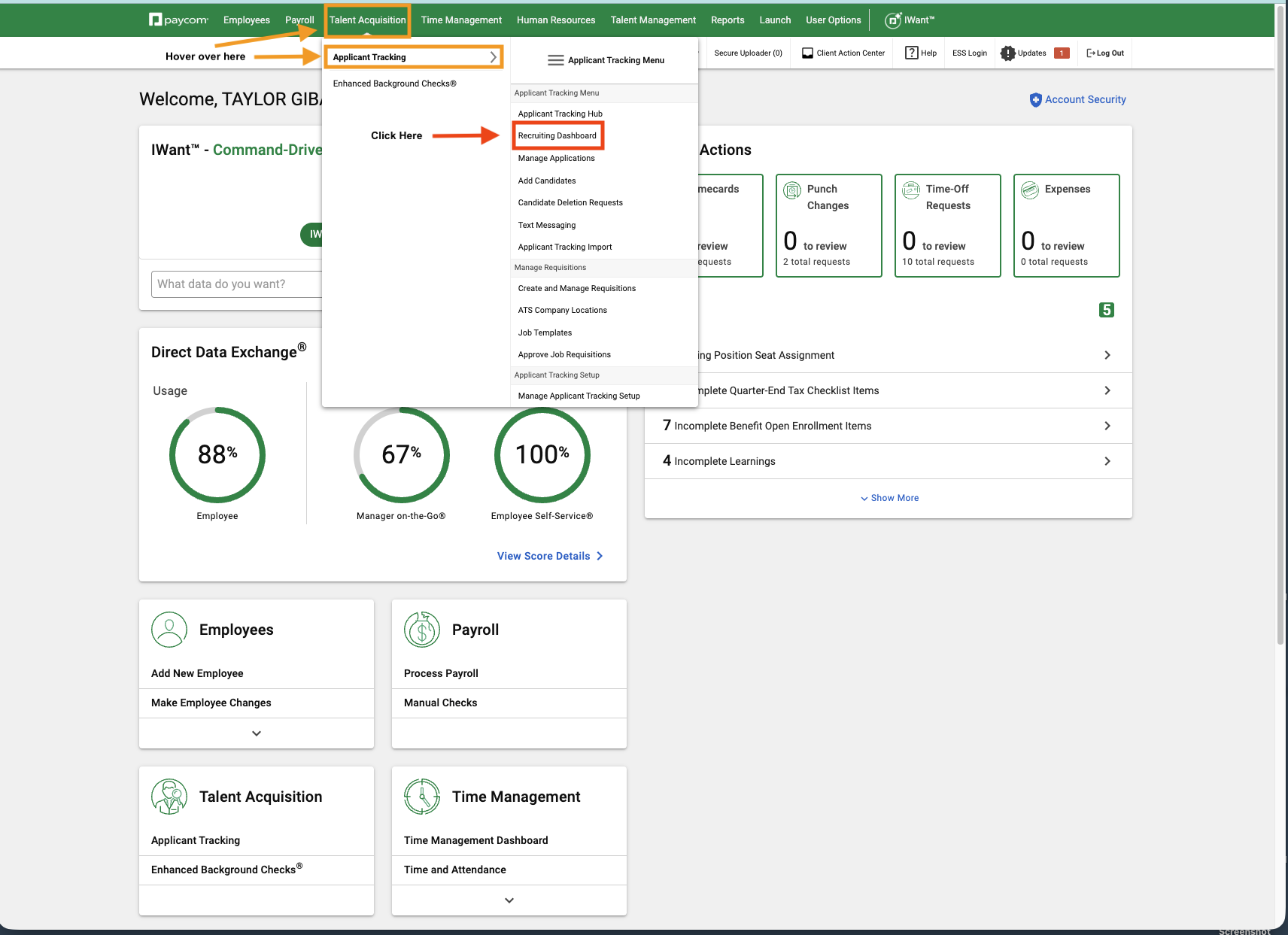
ATS
We use Paycom as our ATS(Applicant Tracking System) that is the system where all applications are held, candidate communication is logged, and candidate feedback is held. I don't personally like the way that emails from Paycom look for standard communication - so I email them out of my inbox and then just log it in the ATS; the only email that will come from Paycom is the email for the Offer Letter. We do require a candidate to sign an offer letter in order for them to start work.
Paycom can also text, and it's got some pretty solid ATS functionality.
Tax Forms — W2 & 1099
Where forms are mailed, who generates them, and how people receive them.
W2s — Employee Tax Forms
W2s are generated by Paycom. Paper copies mailed to:
Employees with digital delivery enabled in Paycom receive their W2 via Paycom ESS — no paper copy sent.
1099s — Contractor Tax Forms
Paycom-generated: Generated and mailed to contractors by Paycom. Paper copies to same Rentals Warehouse address above.
Ramp-generated: For contractors paid through Ramp. Ramp files and mails directly to the contractor. We receive digital copies of Copy A and the 1096.
Parental Leave Coverage for Taylor
- Look through P-Card transactions (accounting section of Ramp) - if any missing requirements (GL code, Class, Memo) reach out to team member
- Process any outstanding Accounts Payable transactions (Bill Pay Section of Ramp)
- Process any outstanding Accounts Receivable transactions (Monday.com invoicing board + QuickBooks Online)
- Reminder about Payday (Team meeting)
- Weekly Connect with Vince - double check any potential questions with my P-Card
- Export Day Rates as .csv (Taylor has shared google sheet with you)
- Payroll Due to Paycom - Please process payroll by 1pm CST - including importing any day rates that need to be processed.
- Sync any complete transactions from Ramp into QBO (mark as ready to sync and they will automatically pull in overnight)
- Look at transactions from QBO Bank Feeds (1003,1004,1005), confirm coding of each transaction, and either post it under that coding, or match a transaction to its respective bill/invoice
- Process financials for KP and SERV. (log into QBO, print P&L + Balance Sheet)
- Review Financials for SERV. and KP (what you printed off yesterday)
- Process any invoices posted to Invoicing board
- Process any AP Transactions
- Sync any Ramp transactions that are ready
- Sync any QBO Bank Feed transactions - either posting them to appropriate GL coding, or matching them to respective Bill/Invoice
- Review any Ramp approvals
- Post Payroll Transactions to QBO
- Process any AP Transactions in Ramp
- Process any invoicing transactions in QBO
- Review QBO Bank Feed transactions
- Confirm Payroll Deposited (I just check my bank account)
- Sync QBO transactions
- Sync Ramp Transactions
- Process any invoicing items added to invoicing board
- Process any AP items received into Ramp
- Sync any QBO Bank Feed Transactions
- Sync any ready Ramp Card Trasnactions
- Process any additional invoices added to invoicing board
- Process any AP received into Ramp
- Sync any Ramp Card Transactions
- Sync any QBO Bank Feed transactions
- Payday Reminder (Team meeting)
- Weekly Sync with Vince
- Review any Ramp Card transactions to sync into QBO
- Review QBO Bank Feed transactions
- Export Day Rates
- Process Payroll in Paycom DUE BY 1PM